Unicorn Script Jitter: A Playful Web Font
In the crowded landscape of digital design, establishing a distinct visual voice is paramount. As web designers and UI creators, we constantly search for typefaces that do more than just convey information; they must evoke emotion and guide user behavior. Unicorn Script Jitter emerges as a compelling option within the Script Amp collection, offering a unique blend of handwritten charm and structured clarity. This font is not merely a decorative element but a strategic tool for crafting engaging digital experiences.
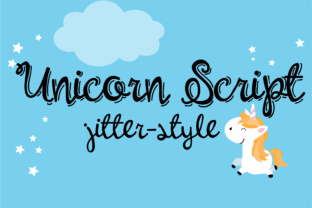
The visual character of Unicorn Script Jitter is defined by its hand-written aesthetic, which feels authentic rather than manufactured. The defining feature, however, is the outline style reminiscent of chalk on a blackboard. This "jitter" effect introduces a subtle vibration to the letterforms, creating a sense of movement and energy. For digital product creators, this means the font captures attention without overwhelming the viewer. It strikes a delicate balance between whimsical and professional, making it suitable for brands that want to appear approachable yet credible.
Enhancing Visual Hierarchy in Web Layouts
Effective web design relies heavily on visual hierarchy. Users scan pages rather than reading every word, so typography must guide their eyes logically. Unicorn Script Jitter excels in roles that require high impact at a glance. It is ideally suited for hero sections, landing page headers, and call-to-action areas where immediate engagement is critical. When used in these prominent positions, the font’s distinctive outlines create a strong focal point, breaking the monotony of standard sans serif or serif body copy.
Consider a coaching website or a creative portfolio. The primary headline needs to communicate personality instantly. By employing Unicorn Script Jitter for the main title, you establish a tone of creativity and warmth. This sets the stage for the rest of the content, signaling to the visitor that the brand is human-centric and innovative. However, restraint is key. Because this is a display font with significant visual weight, it should be reserved for short phrases, titles, or logos. Using it for long paragraphs would compromise readability and disrupt the scanning behavior of users.
Readability and Responsive Design Considerations
While the aesthetic appeal of a handwritten font is undeniable, its performance across devices is a practical concern for any UI designer. Unicorn Script Jitter performs best when given adequate space. On desktop views, the jittery outlines add texture and depth, especially against solid color backgrounds or subtle gradients. However, on mobile screens, intricate details can sometimes blur if the font size is too small.
To maintain legibility on smaller devices, ensure that headings using this font are scaled appropriately. Avoid placing Unicorn Script Jitter on busy image overlays where contrast might be insufficient. Instead, use it on clean, solid backgrounds or within dedicated content sections with ample padding. For dark mode interfaces, the chalkboard-style outline can be particularly effective, mimicking the classic classroom aesthetic while maintaining modern digital clarity. Always test the font on various screen sizes to ensure the jitter effect remains a stylistic asset rather than a visual distraction.
Strategic Font Pairing for Brand Identity
No font exists in isolation. The power of Unicorn Script Jitter is amplified when paired correctly with complementary typefaces. Since this script font carries a heavy decorative load, it requires a neutral partner for body copy. A clean, geometric sans serif font is often the best choice. This combination creates a modern typography stack that balances personality with functionality. The sans serif ensures that detailed information, such as product descriptions or blog content, remains easy to read, while Unicorn Script Jitter handles the emotional heavy lifting in headers.
Alternatively, for a more editorial or boutique feel, you might pair it with a refined serif font. This approach works well for online stores selling artisanal goods or luxury items. The serif adds a layer of sophistication and tradition, while the script injects a contemporary, handcrafted vibe. This duality can enhance brand trust, suggesting that the business values both quality craftsmanship and modern presentation. When building a brand identity kit, include these pairing examples to ensure consistency across all digital assets, from social media graphics to email newsletters.
Applications Across Digital Products
The versatility of Unicorn Script Jitter extends beyond standard websites. It is a valuable asset for various digital products and marketing materials. For SaaS founders, using this font in banner ads or promotional headers can soften the technical nature of the product, making it feel more user-friendly. In course sales pages, it can highlight key benefits or testimonials, adding a personal touch that resonates with learners.
- Landing Pages: Use for headlines to increase conversion rates through emotional connection.
- Online Stores: Ideal for category banners or special offer announcements.
- Blog Graphics: Enhances shareability of quote images and header illustrations.
- Digital Ads: Captures attention in crowded social media feeds.
- Logo Design: Suitable for brands seeking a playful, memorable mark.
For bloggers and content creators, integrating this font into header images can significantly boost click-through rates. The unique style stands out in thumbnail previews, distinguishing your content from competitors. Similarly, for digital templates sold on marketplaces, including Unicorn Script Jitter as a premium font option adds value for buyers looking for distinctive design elements.
Licensing and Technical Implementation
Before implementing Unicorn Script Jitter in client projects or commercial products, it is essential to review the licensing terms. As a premium font from Script Amp, it typically comes with specific usage rights for web and print. Ensure you have the appropriate license for webfont usage if you plan to embed it directly into your website via CSS. Check for included file formats such as WOFF and WOFF2, which are optimized for web performance.
Additionally, verify if the font package includes alternates or multiple weights. While Unicorn Script Jitter is primarily a display typeface, having access to different styles can provide flexibility in design. Multilingual support is another factor to consider if your audience is global. Ensuring that the font supports the necessary character sets will prevent layout issues and maintain a consistent brand experience for all users.
In conclusion, Unicorn Script Jitter is more than just a cute script; it is a strategic design asset. By understanding its strengths in visual hierarchy, readability, and brand tone, web designers and digital creators can leverage it to build more engaging and memorable online experiences. Whether used for a boutique store, a creative portfolio, or a dynamic landing page, this font offers the perfect jitter of personality needed to stand out in the digital realm.